

What is prompt testing? Test cases, datasets, and regression checks explained
Prompt testing turns prompt changes into repeatable regression checks by running each version against a fixed set of representative inputs and scoring the outputs against explicit expectations. Prompt behavior depends on the prompt text, model, parameters, tools, and retrieved context, so changing any of those inputs can alter results even when the prompt itself stays similar. A strong test suite covers normal cases, edge cases, known failures, and adversarial inputs so improvements in one example don't hide regressions elsewhere.
Braintrust connects prompt versions with datasets, scorers, experiment comparisons, and CI checks, making every change measurable against a stored baseline before release. Production failures can then be added back to the test set, keeping regression coverage aligned with the failures users encounter. Start free with Braintrust.
What is prompt testing?
Prompt testing is the practice of running a prompt and its model configuration against representative inputs, attaching an explicit expectation to each case, and applying the same scoring method across every run. Each run produces a comparable record tied to a specific prompt version, which makes regressions visible when the configuration changes.
The recorded configuration should include the model, parameters such as temperature and reasoning effort, available tools, response format, and any retrieval step that supplies context. When those settings travel with the prompt version, a score difference between two runs can be traced to a model swap or a temperature change as readily as to an edited instruction.
Unlike a manual check in a chat interface, prompt testing reruns the same representative cases against the same expectations whenever a configuration changes. Repeating the same test conditions shows whether a change improved the intended case without breaking behavior that already worked.
What a prompt test verifies
A prompt test should verify every behavior that decides whether a configuration is safe to release. A few outputs that look acceptable in a chat window cover only a fraction of those behaviors.
Task correctness measures whether the output completes the intended job, such as routing a support ticket to the correct queue or extracting the right fields from an invoice. The expected behavior should be explicit enough that the result can be scored consistently across runs.
Format compliance checks whether the response follows structural requirements such as valid JSON, schema adherence, required fields, and length limits. Deterministic assertions work well here because the expected format can usually be verified in code.
Behavioral boundaries verify when the model should refuse, escalate, or avoid taking an action. In domains with policy or compliance requirements, a missed refusal can expose protected data or trigger an action the application was never authorized to take.
Tool and retrieval behavior measures whether the model selects the correct tool, supplies valid arguments, uses retrieved evidence appropriately, and avoids tools that should not be called for a given input.
Operational limits track latency and token cost alongside quality. Prompt edits that add examples, context, or reasoning instructions can improve accuracy while also increasing response time or spend, so those changes belong in the same test run.
Prompt testing vs prompt evaluation, A/B testing, and unit testing
These four practices overlap in tooling but answer different questions, and a release process usually needs more than one of them.
| Practice | Question it answers | When it runs | Signal it produces |
|---|---|---|---|
| Prompt testing | Does this configuration still behave correctly on the cases we already care about? | Before release, whenever the prompt, model, parameters, tools, or context change | Pass or fail per case, plus regressions measured against a stored baseline |
| Prompt evaluation | How good is the output, and against which criteria? | Alongside prompt tests offline, and on live traces after deployment | Scores for criteria such as correctness, faithfulness, tone, and safety |
| A/B testing | Which variant performs better for real users? | After release, on production traffic split between variants | A comparison of product and quality metrics across variants |
| Unit testing | Does this deterministic code return the expected value? | On every commit, in seconds | An exact pass or fail that needs no scoring interpretation |
In practice, prompt tests supply the fixed cases and repeatable runs, while evaluation supplies the scoring framework used to interpret the results.
Also read:
Anatomy of a prompt test case
A useful prompt test case needs enough information to reproduce the run, judge the output, and compare the result with later versions. Six elements make up that record.
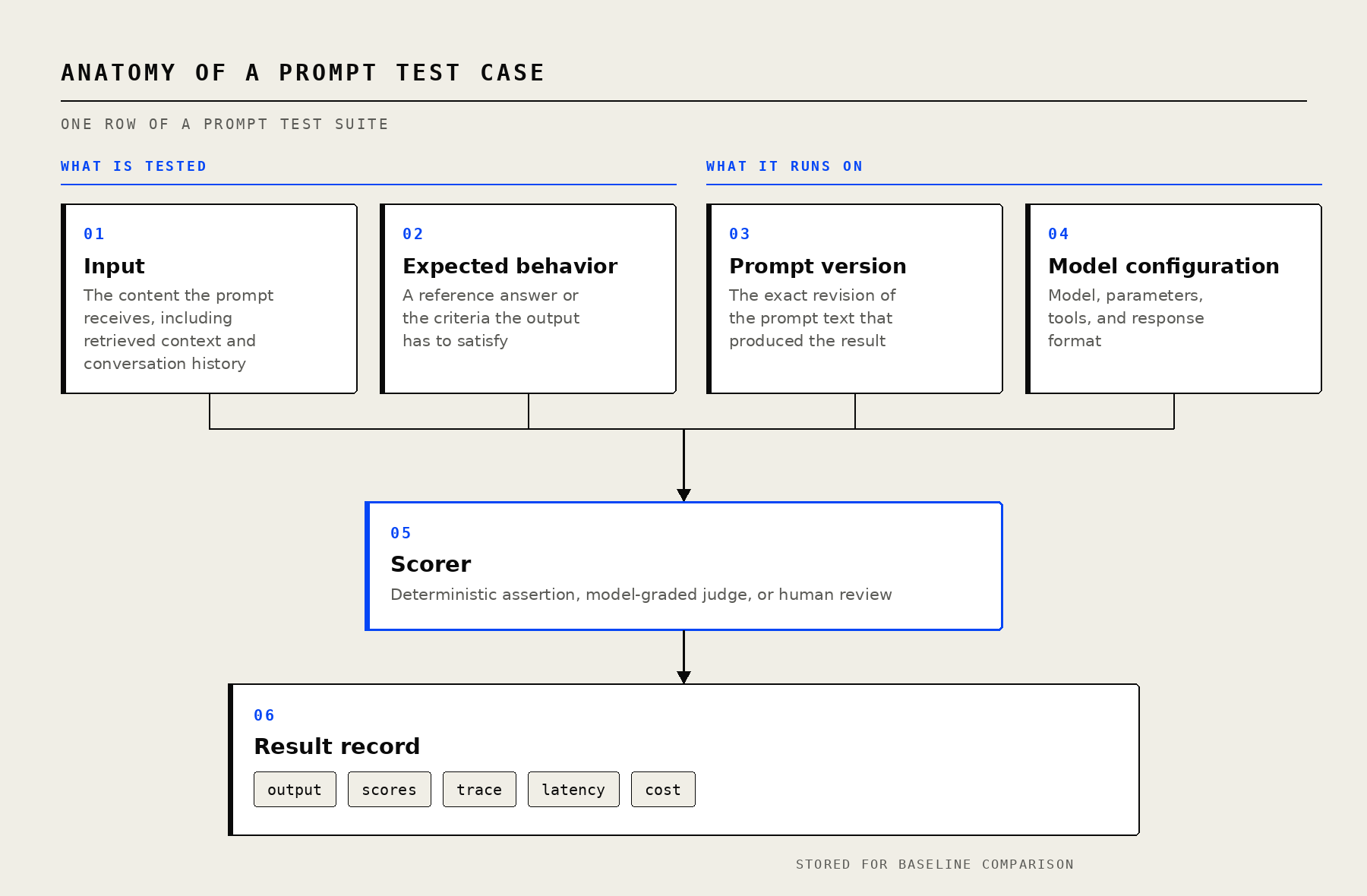
Each test case records what is tested and what it runs on, so a later score change can be attributed to a specific edit.
Input: The exact content supplied at runtime, including the user message plus any retrieved documents, conversation history, or customer data assembled around it.
Expected behavior: The condition the output should satisfy. Some cases have a single correct answer, such as a classification label or extracted value, while others use criteria such as required facts, prohibited behavior, or escalation rules. A test case without an explicit expectation cannot produce a meaningful pass or fail result.
Prompt version: The exact prompt revision associated with the run. Braintrust treats prompts as versioned objects, which keeps historical prompt text and configuration available for later comparison and rollback.
Model configuration: The model, parameters, tool definitions, and response format used during execution. Recording these settings prevents a model or parameter change from being mistaken for a prompt regression.
Scorer: The rule used to judge the output, whether that means deterministic code, an LLM-as-a-judge rubric, or human review. Multiple scorers can evaluate different requirements on the same case.
Result record: The generated output together with its scores, trace, latency, and token cost. Storing the result enables later baseline comparisons and regression analysis.
A support-ticket routing case might look like this:
| Component | Example value |
|---|---|
| Input | {"ticket": "Card declined twice, tried a second card, still declined. Order 4417."} |
| Expected | {"queue": "billing", "priority": "high"} |
| Prompt version | support-router v7 |
| Model configuration | gpt-5-mini, reasoning effort: low, JSON response format |
| Scorers | Exact match on queue, JSON schema validation, judge score on escalation wording |
| Result | Queue correct, priority correct, schema valid, judge 0.8, latency 1.9s, cost $0.0004 |
How prompt test cases become a dataset
A prompt testing dataset brings representative cases into one versioned collection so the same coverage can be reused across prompt changes. The strongest datasets reflect the range of behavior the application needs to handle, with enough variation to expose failures without filling the suite with near-duplicate examples.
Normal behavior cases represent the requests the feature handles most often. Production logs are especially useful because they preserve the ambiguity, inconsistent formatting, and unexpected phrasing that synthetic examples often remove.
Edge cases cover inputs near the boundaries of expected behavior, including empty fields, unusually long requests, unexpected languages, ambiguous classifications, and formatting that downstream parsers still need to handle correctly.
Known failure cases preserve interactions that have already produced a bug, escalation, or user complaint. Each case should include the corrected expected behavior so future prompt changes are checked against the same failure before release.
Adversarial inputs test how the prompt behaves when an input deliberately tries to override instructions, expose protected information, or push the application outside its intended role.
Braintrust datasets store input, expected, metadata, and tags for each record, which makes the same test collection useful for both regression testing and segmented analysis. Labels such as category, difficulty, and source show where a score decline is concentrated, so a drop in the overall pass rate can be traced to, say, refund requests or non-English inputs.
Dataset versions also need to remain stable during a comparison. If cases are edited between two experiment runs, the resulting scores no longer measure the same test set. Pinning the dataset version or snapshot used for a release comparison preserves the baseline, while newly added cases can move into the next dataset version.
Types of prompt tests and scoring methods
Deterministic assertions
Deterministic assertions work best when the expected behavior can be expressed as code. Schema validation, exact label matches, required or forbidden strings, numeric tolerances, tool-call checks, and latency limits all produce repeatable results without additional model calls.
In Braintrust, deterministic checks are implemented as custom code scorers, and __pass_threshold can define the minimum score required for a result to pass.
const project = braintrust.projects.create({ name: "my-project" });

project.scorers.create({
  name: "Equality scorer",
  slug: "equality-scorer",
  description: "Check if output equals expected",
  parameters: z.object({
    output: z.string(),
    expected: z.string(),
  }),
  handler: async ({ output, expected }) => {
    const matches = output === expected;

    return {
      score: matches ? 1 : 0,
      metadata: { exact_match: matches },
    };
  },
  metadata: {
    __pass_threshold: 0.5,
  },
});
Model-graded scores
Requirements such as helpfulness, faithfulness, tone, and completeness usually cannot be reduced to a deterministic rule. An LLM-as-a-judge scorer evaluates the output against a written rubric and converts the judge response into a numeric score, which makes subjective criteria usable across an entire dataset.
Braintrust also provides pre-built autoevals for common evaluation needs such as factuality, semantic similarity, edit distance, JSON structure, and SQL equivalence. Custom judges can define their own prompt, judge model, score mapping, and pass threshold.
const project = braintrust.projects.create({ name: "my-project" });

project.scorers.create({
  name: "Helpfulness scorer",
  slug: "helpfulness-scorer",
  description: "Evaluate helpfulness of response",
  tags: ["quality"],
  messages: [
    {
      role: "user",
      content:
        'Rate the helpfulness of this response: {{output}}\n\nReturn "A" for very helpful, "B" for somewhat helpful, "C" for not helpful.',
    },
  ],
  model: "gpt-5-mini",
  useCot: true,
  choiceScores: {
    A: 1,
    B: 0.5,
    C: 0,
  },
  metadata: {
    __pass_threshold: 0.7,
  },
});
Judge design carries its own failure modes around rubric clarity, position bias, and verbosity bias, and the prompt evaluation guide covers calibrating a judge against human labels.
Human review
Human review does not need to run across every test case. It earns its cost when establishing expected answers, settling disputes between automated scorers, and periodically checking whether model-graded judges still agree with human judgment. Braintrust runs structured human review across logs, experiments, and dataset rows, with assignments and multiple reviewers, so expert judgment lands on the same records automated scorers use.
Side-by-side comparison and output diffs
Scores show whether a result improved or regressed, while output diffs show what changed. Braintrust experiment comparison aligns matching test cases across runs and shows score deltas, output changes, and metadata side by side, so a regression can be investigated without reading every result.
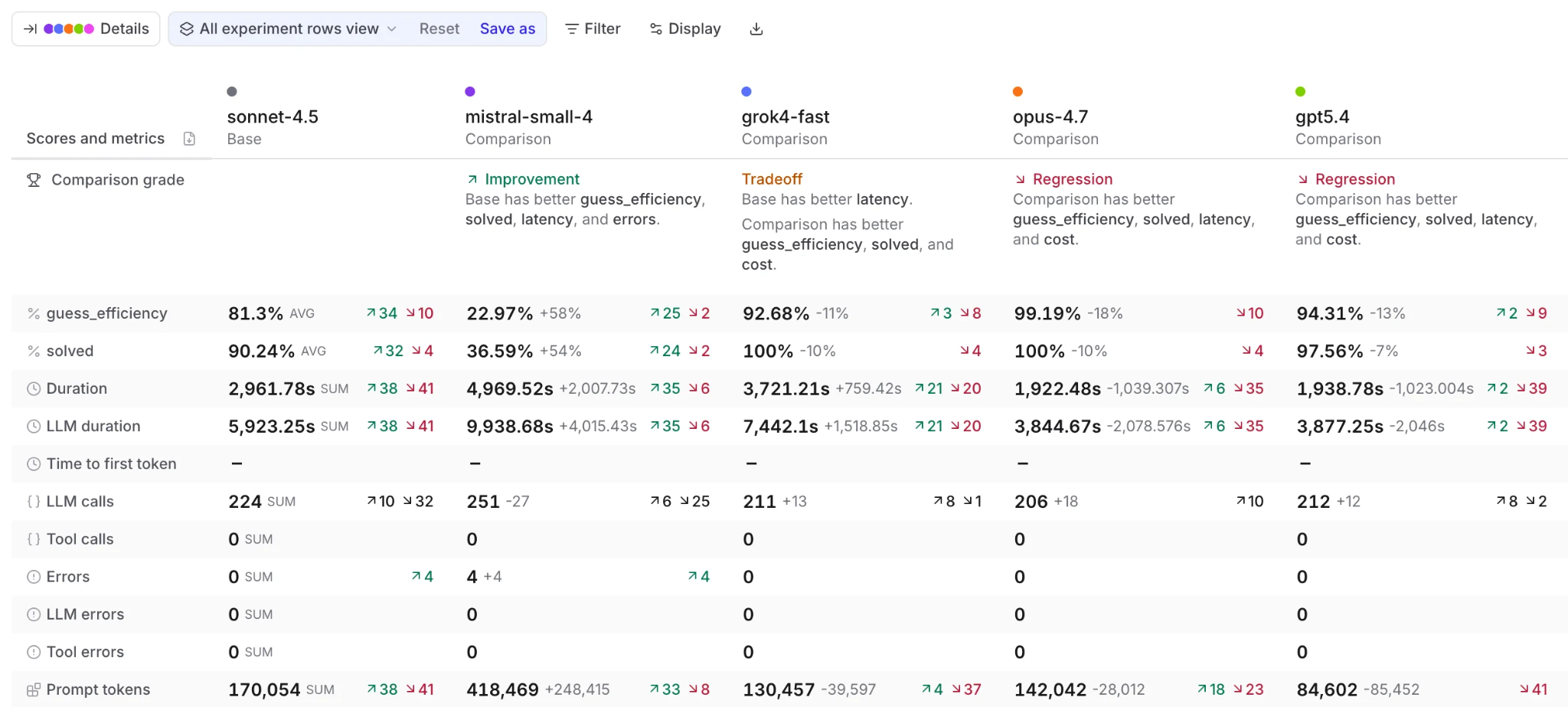
A comparison grades each run against the base experiment and separates score movement from latency, error, and token changes.
Diff mode compares the baseline to the comparison experiment, the comparison experiment back to the baseline, and the expected output to the generated output within one run. Opening an individual row shows a character-level diff, with side-by-side output columns available for closer inspection.
Field diffs are capped at 4,096 characters, so long prompts and outputs are easier to inspect when logged as separate structured fields such as system_prompt, context, and user_query. Cross-run comparisons also depend on matching inputs. When inputs contain changing values such as timestamps or session IDs, a custom comparison key can align cases using stable fields.
Baseline comparison and prompt regression testing
A regression check compares a new prompt run with a stored reference run on the same dataset. A factuality score of 0.82, for example, says little in isolation, but the same score becomes a clear regression when the baseline achieved 0.89 on the identical 200 cases.
How to set a baseline
The baseline is the reference experiment used to judge later runs, and it will usually represent the configuration currently serving production. In Braintrust, one experiment can be pinned as the baseline for another, a project-wide default can be set, or the most recent experiment from the same Git branch is used when no baseline has been selected.
Accurate comparison also depends on matching the same cases across runs. Braintrust uses the input field by default, but fields such as timestamps and session IDs can prevent otherwise identical cases from aligning. A custom comparison key such as input.user_query or [input.query, metadata.category] can use stable fields when the complete input changes between runs.
Quality regression checks
Review aggregate scores and individual case results together. An average can remain stable even when several previously successful cases regress sharply, so release review should identify both overall score movement and the specific inputs responsible for it. Sorting or filtering results by regression and metadata reveals whether failures cluster in one category.
Latency and cost regression checks
Latency and token usage need their own acceptable ranges during release review, since a prompt that scores higher after gaining a few examples may also respond more slowly and cost more per call. Braintrust experiment summaries compare quality alongside latency, cost, errors, and load, which keeps performance regressions visible when a prompt otherwise scores better.
Trials, variance, and flaky test cases
Model and judge outputs can vary between identical runs, which means a small score difference may reflect normal variance rather than a meaningful prompt change. Repeating each case and averaging the results provides a more reliable comparison. Braintrust exposes repeated runs through trialCount in TypeScript and trial_count in Python, with grouped results showing how much each input varies across trials.
Cases with consistently wide score ranges need closer review before they become release gates. The expectation may need clarification, or the case may need to be removed from the gating set if its output remains too unstable to provide a reliable pass-or-fail signal.
The prompt testing workflow, from playground to CI
Prompt testing usually moves from fast iteration to a permanent experiment record, then into automated release checks, carrying the same dataset and scoring criteria forward as the prompt becomes ready to ship.
Stage 1. Test prompt changes in the Playground
The Braintrust Playground is a no-code environment for testing prompt changes against a linked dataset and one or more scorers. Running a Playground executes each task across the selected dataset rows, while the diff view makes prompt variants easy to compare and sampling speeds up iteration on large datasets.
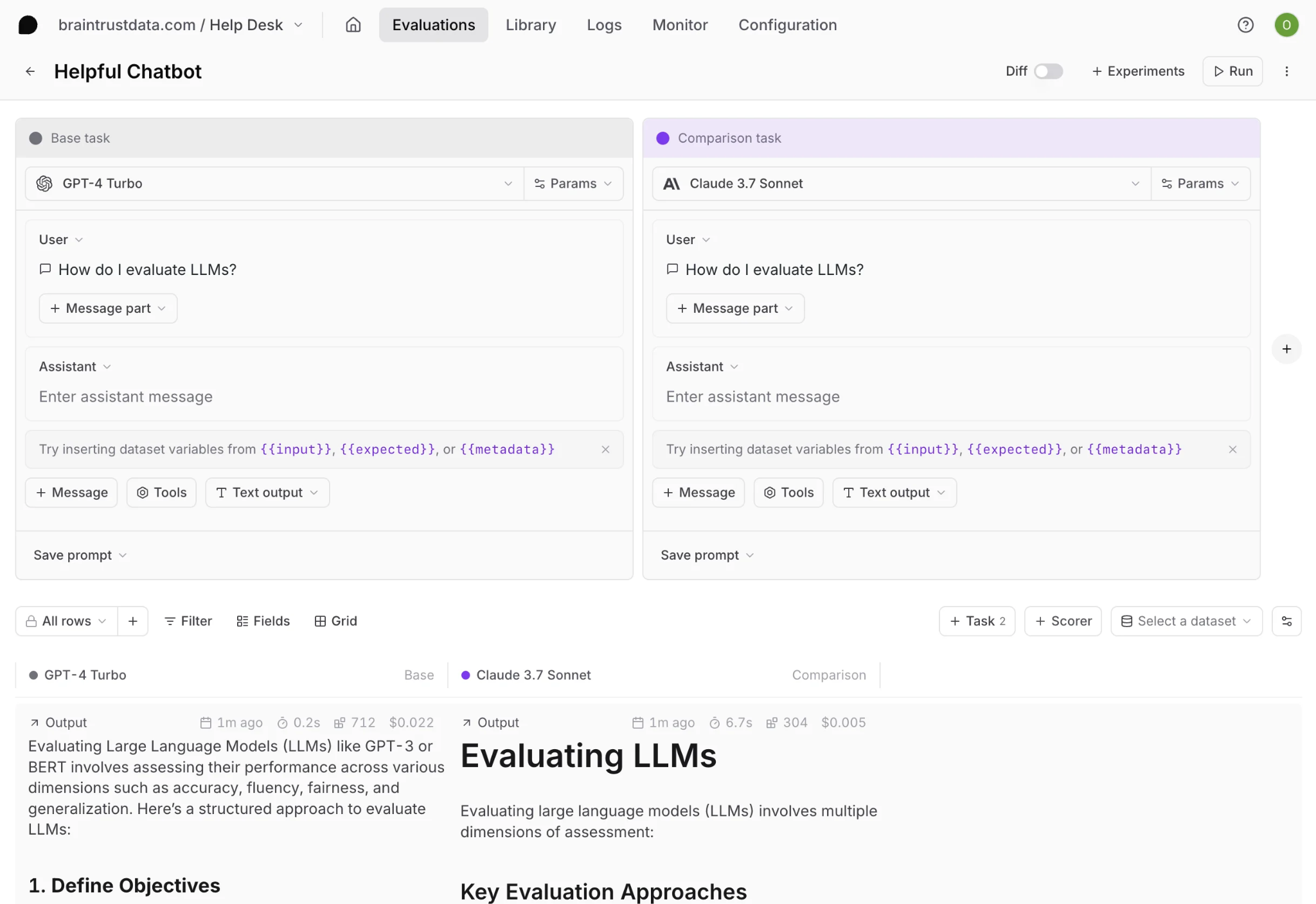
A Playground runs two prompt-and-model configurations over the same rows so wording changes can be compared before anything is saved.
Playground results are overwritten when the configuration is run again, which makes the Playground useful for exploration but not as the permanent record of a release decision. Product managers and other non-engineering collaborators can use the same workflow to test prompt wording before the configuration moves into a saved evaluation.
Stage 2. Save evaluations as experiment records
Once a configuration is ready for formal comparison, an experiment stores the evaluation run as an immutable record that can be compared with other experiments later. A successful Playground configuration can be promoted with + Experiment, while code-based evaluations can run from a script or through the bt eval CLI.
Eval("My Project", {
  experimentName: "My experiment",
  data: initDataset("My Project", { dataset: "My dataset" }),
  task: async (input) => {
    // Your LLM call here
    return await callModel(input);
  },
  scores: [Factuality],
  metadata: {
    model: "gpt-5-mini",
  },
});
Recording the model, prompt version, and dataset version in experiment metadata preserves enough context to explain score changes weeks later, and historical runs can then be filtered or grouped by any of those fields.
Stage 3. Run regression checks in CI
After the evaluation is defined in code, the same suite can run automatically on pull requests. Braintrust's GitHub Action executes the evaluation and posts a summary of improvements and regressions against the baseline experiment directly in the pull request.
name: Run evaluations

on:
  pull_request:
    branches: [main]

permissions:
  pull-requests: write
  contents: read

jobs:
  evaluate:
    runs-on: ubuntu-latest
    steps:
      - uses: actions/checkout@v4

      - name: Set up Node.js
        uses: actions/setup-node@v4
        with:
          node-version: 24

      - name: Install dependencies
        run: npm install

      - name: Run evals
        uses: braintrustdata/eval-action@v2
        with:
          api_key: ${{ secrets.BRAINTRUST_API_KEY }}
          runtime: node
terminate_on_failure can fail the build when an evaluation errors, while report_scores and report_metrics limit the pull-request comment to the scores and metrics relevant to review. Other CI systems can run the same evaluation files through bt eval, including a smaller smoke suite on pull requests followed by the complete suite after merge.
# Smoke run on pull requests
bt eval tests/ --first 20 --no-input --json

# Full run after merge
bt eval tests/ --no-input --json
Release criteria and thresholds
Evaluation results only become a release gate when the passing conditions are explicit. Individual scorers can use pass thresholds to mark each result as passing or failing, while a custom Reporter() can define failure conditions across the complete run and control the process exit code. Keeping those criteria in the repository ensures that local testing, CI checks, and release decisions use the same standard.
How production failures become new test cases
A regression suite stays useful only when production failures expand its coverage. Tracing, dataset curation, and online scoring carry a bad live interaction into a permanent test case that future prompt versions must pass.
Trace what runs in staging and production
Prompt failures are easier to reproduce when the original request is preserved with the information needed to explain what happened. Braintrust tracing records inputs, outputs, tool calls, latency, token usage, and other execution details as structured spans, so each reported failure arrives with the exact request that produced it.
Turn failed interactions into test cases
Add relevant traces in Braintrust Logs or Review to a dataset, map the logged input into the new test case, and correct the expected output to reflect the behavior that should have occurred. Dataset rows can also retain a reference to the original trace through the origin field, keeping the production interaction available for later investigation.
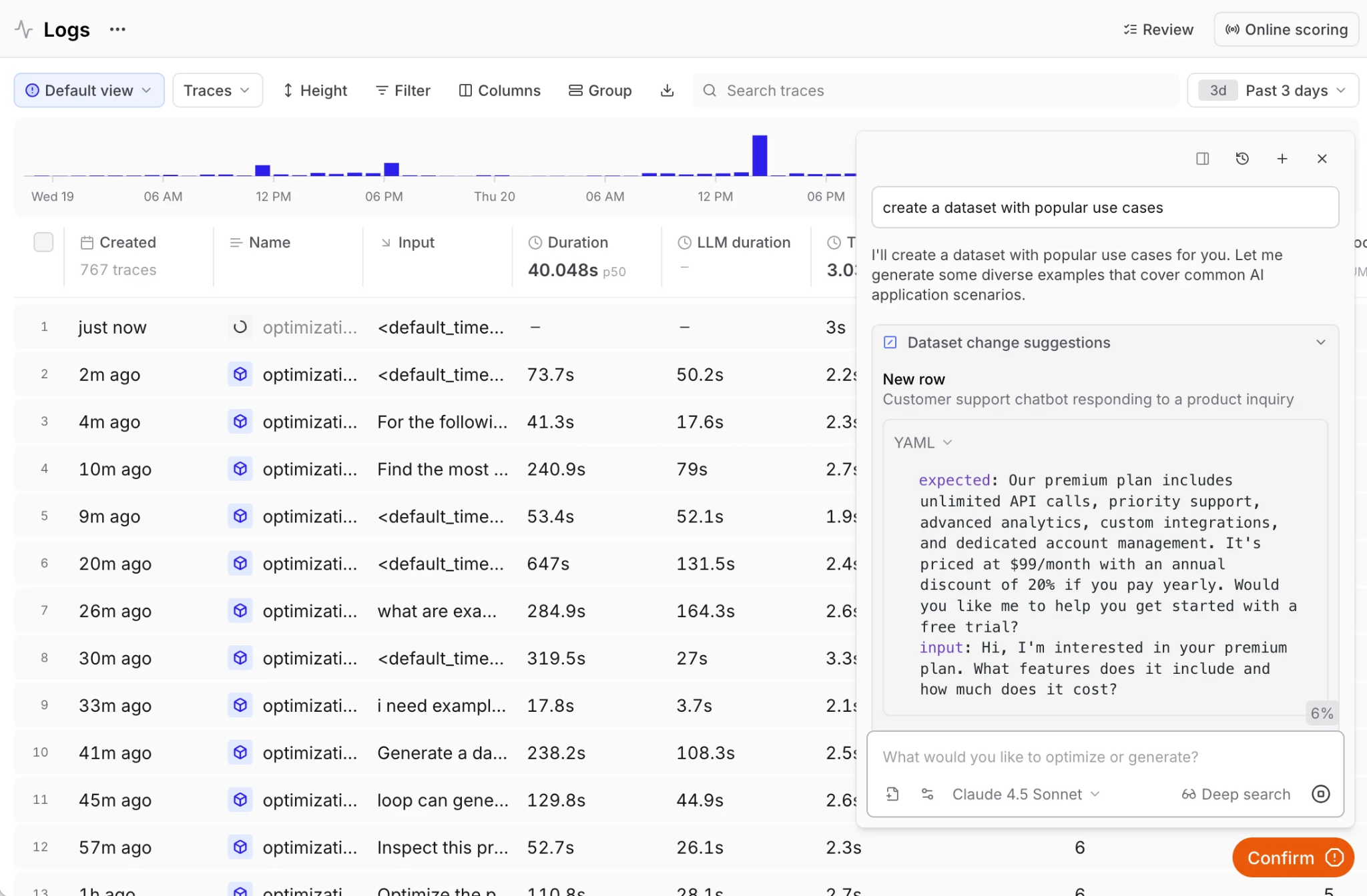
Loop turns a natural-language request into suggested dataset rows drawn from production logs, which a reviewer confirms before they enter the test set.
When the same selection criteria apply across many traces, dataset pipelines can process them in bulk. Loop can also find production cases from a natural-language request, reducing the engineering work required to identify failures worth adding to regression coverage.
Score production traffic with the same scorers
Online scoring applies evaluation criteria to live traces asynchronously, so the same quality definitions used during prompt testing can continue after deployment. Scoring rules can target spans, complete traces, or groups of traces and sample only the traffic relevant to a particular evaluation.
Low-scoring interactions then become candidates for the next dataset update. Converting confirmed production failures into regression cases keeps prompt coverage aligned with real usage and prevents the same failure from returning unnoticed in a later release.
What daily prompt regression testing costs
Prompt regression costs depend on how often the suite runs, how many cases it contains, which scorers are applied, and how much trace data is retained. With cost drivers separated, monthly spend can be estimated before test coverage or CI frequency goes up.
Cost drivers in a regression run
Task model tokens cover the model calls required to run the prompt against every test case. Those calls are billed by the model provider or use Braintrust model credits when models are accessed through Braintrust.
Judge model tokens apply when model-graded scorers evaluate outputs. Adding multiple judge scorers increases model usage because each scorer requires its own evaluation call.
Scored outputs count each output evaluated by an LLM-as-a-judge, autoeval, or custom code scorer. Braintrust pricing includes a monthly score allowance before usage-based charges apply.
Processed data covers stored traces and evaluation data, while retention determines how long historical runs remain available for comparison.
A worked estimate for a daily run
Consider a 200-case regression suite with three scorers per case, run once a day. That produces 600 scores per run, or about 18,000 scores over a 30-day month. Adding a 40-case smoke suite with three scorers across 20 pull requests contributes another 2,400 scores, bringing the monthly total to roughly 20,400.
The Braintrust Starter plan includes 10,000 scores per month, so 10,400 of those scores would be billable. At $2.50 per 1,000 additional scores, the scored-output portion of this workload would cost about $26 beyond the included allowance. Model-token usage and processed trace data are billed separately from scored outputs, so the final monthly cost depends on both evaluation volume and the model-token and trace-data usage generated by the prompt regression tests. The plans and limits page lists the current allowances and on-demand rates.
Cost control tactics
Use code for deterministic checks: Schema validation, exact matches, tool-call assertions, and similar rules avoid judge-model tokens while still producing scored results.
Reserve model judges for semantic criteria: Criteria such as helpfulness, faithfulness, and completeness justify model-based scoring when deterministic checks cannot capture the requirement.
Split testing by release stage: A smaller smoke suite can run on every pull request, with the complete regression dataset reserved for merge or other higher-confidence release points.
Sample during prompt iteration: Running a subset of the dataset in the Playground reduces unnecessary evaluation volume until the prompt configuration is ready for a complete experiment.
Sample production traffic deliberately: Online scoring doesn't need to evaluate every live request to surface recurring failure patterns, especially in high-volume applications.
Cache repeated model calls: Reusing identical model responses across repeated evaluation runs can reduce model spend when the underlying request has not changed. The LLM gateway caching guide covers where that reuse is safe.
What to look for in a prompt testing tool
Dataset management: Versioning, metadata, and tags should make test cases reusable as prompts change.
Mixed scoring methods: Deterministic assertions, model-graded judges, and human review should work against the same test records so each requirement can use the most appropriate evaluation method.
Baseline comparison: Aggregate score changes should come with per-case deltas and output diffs that name which inputs improved or regressed.
CI integration: Prompt evaluations should run automatically during pull-request review, with release criteria reported where engineering decisions are already being made.
Production capture: Tracing and online scoring should use the same evaluation criteria as offline testing, so failures observed after deployment can become new regression cases.
Predictable pricing: Usage should map to measurable units such as scored outputs and processed data, which makes recurring regression testing easier to budget before increasing test frequency or dataset size.
Why Braintrust is the best choice for prompt testing
Braintrust ties prompt testing directly to release control. Prompt changes can be evaluated against versioned datasets and stored baselines, with pass criteria carried into pull-request review through the native GitHub Action. Each prompt change is then judged against one quality standard from its first Playground run through the pull request that ships it.
The same project history also keeps engineers, product managers, and reviewers aligned around the evidence behind each release decision. Production failures can expand regression coverage, human review can resolve cases automated scorers cannot settle confidently, and prompt quality can keep being measured after deployment without rebuilding the evaluation workflow in another system. Production teams at organizations like Notion, Stripe, Vercel, Zapier, Instacart, and Dropbox use Braintrust to evaluate prompt changes before release and monitor quality after deployment.
Turn prompt changes into release checks with Braintrust on the free tier →
FAQs about prompt testing (2026)
What is prompt testing in AI?
Prompt testing checks whether a prompt configuration continues to produce acceptable results across a representative set of inputs. Each case has a defined expectation and a repeatable scoring method, which makes it possible to detect regressions when the prompt, model, parameters, tools, or retrieved context change.
What is the difference between prompt testing and prompt evaluation?
Prompt testing focuses on repeatability and regression detection, using fixed cases to check whether a configuration still behaves as expected. Prompt evaluation focuses on how quality is measured, including criteria such as correctness, relevance, safety, and judge calibration. In practice, prompt tests provide the cases and repeatable runs, while evaluation provides the scoring framework for interpreting the results.
How many test cases do I need to test a prompt?
For many features, 20 to 50 well-chosen cases are enough to establish useful initial coverage. The set should represent normal production inputs, known failures, important edge cases, and application-specific adversarial behavior. Grow the set by adding each newly discovered failure; batches of near-duplicate examples add volume without adding coverage.
How do I run prompt tests in CI?
Define the evaluation in code and run it automatically when a pull request changes the prompt or related configuration. A smaller smoke set can provide fast feedback during review, followed by the full regression set before release. Braintrust's GitHub Action can run the evaluation in CI, compare the results against a baseline, and surface regressions directly in the pull request so prompt quality becomes part of the release decision.
How do I compare two prompt versions side by side?
Run both versions against the same dataset version with the same scorers, then read the cases that changed before reading the averages. A version that wins on the aggregate can still lose on the handful of inputs that carry the most risk, and those are the ones a release review should see first.
How much does daily prompt regression testing cost?
Daily cost depends on the number of cases, scorers, runs, model tokens, and stored trace data. Deterministic checks avoid judge-model calls, while LLM-as-a-judge scorers add model usage for every evaluated case. Braintrust's free Starter plan includes 10,000 scores per month, which provides a concrete allowance for estimating when a recurring regression schedule will begin generating additional scored-output charges.
Which is the best prompt testing tool?
Braintrust is the strongest option when prompt testing has to carry into release control. Versioned datasets, mixed scoring methods, baseline comparisons, CI checks, human review, and production scoring live in one project, so the full history of what each prompt version scored, on which dataset, and against which baseline, is in one place.